ActivityWatch使用记录
摘要
关于使用ActivityWatch同步管理mac和pc的屏幕使用时间
官方地址:https://activitywatch.net。
主要用途:可以借用它的同步功能,看到mac和pc的屏幕使用详情。暂时不支持移动设备。
同步设备使用时间
修改配置
安装好activitywatch后,右键状态栏图标->“open config folder”->“aw-qt”,编辑"aw-qt.toml":
添加环境变量
activitywatch的 同步 是通过aw-sync将数据写入到同步目录里,重点是需要设置好AW_SYNC_DIR这个环境的值为自定义目录。
Mac
由于GUI程序无法读取到.zshrc的环境变量,需要利用lanchctl。开启终端,执行如下命令:
1mkdir -p ~/Library/LaunchAgents1 2 3 4 5 6 7 8 9 10 11 12 13 14 15 16 17 18 19 20 21cat > ~/Library/LaunchAgents/com.activitywatch.syncdir.plist << 'EOF' <?xml version="1.0" encoding="UTF-8"?> <!DOCTYPE plist PUBLIC "-//Apple//DTD PLIST 1.0//EN" "http://www.apple.com/DTDs/PropertyList-1.0.dtd"> <plist version="1.0"> <dict> <key>Label</key> <string>com.activitywatch.syncdir</string> <key>ProgramArguments</key> <array> <string>launchctl</string> <string>setenv</string> <string>AW_SYNC_DIR</string> <string>Your_sync_lib</string> </array> <key>RunAtLoad</key> <true/> </dict> </plist> EOF 需要修改的是your_sync_dir,改为需要使用的云同步目录(提前建好,路径有空格的话需要加双引号),如
/Users/xxx/Library/CloudStorage/OneDrive-Personal/aw,除了onedrive,还可以用坚果云或其它同步软件。 加载环境变量:
1launchctl load ~/Library/LaunchAgents/com.activitywatch.syncdir.plist另外起一个终端窗口,验证环境变量:1launchctl getenv AW_SYNC_DIRPC
win+i打开“设置”->“系统”->“高级系统设置”->“环境变量”,在"用户环境变量"处新建:
变量名:AW_SYNC_DIR
变量值:D:\Yun\OneDrive\aw
检查
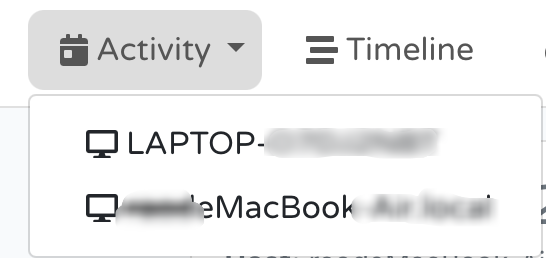
退出软件,重新打开。右键图标看看"Modules"是不是打开了"aw-server-rust"和"aw-sync",再去检查下D:\Yun\OneDrive\aw是不是有以电脑名命名的文件夹,如"LAPTOP-xxx"或"xxxdeMacBookxxx"。
打开dashbord,就可以在Activity上看到可以选择机器了。